What is cXML Punchout?
Our punchout plugin allows for an integration between Infigo and a procurement system. Infigo will handle the e-commerce experience, including a combination of personalised and static products, and then hand over the contents of the basket to a procurement system where they can then go through their own approval workflows before confirming the order.
Our Punchout plugin is a paid plugin. If you read through this article and decide this is something that you would like to use on your platform then please reach out to Support or contact Sales.
How does it work?
It uses an industry standard XML markup called cXML.
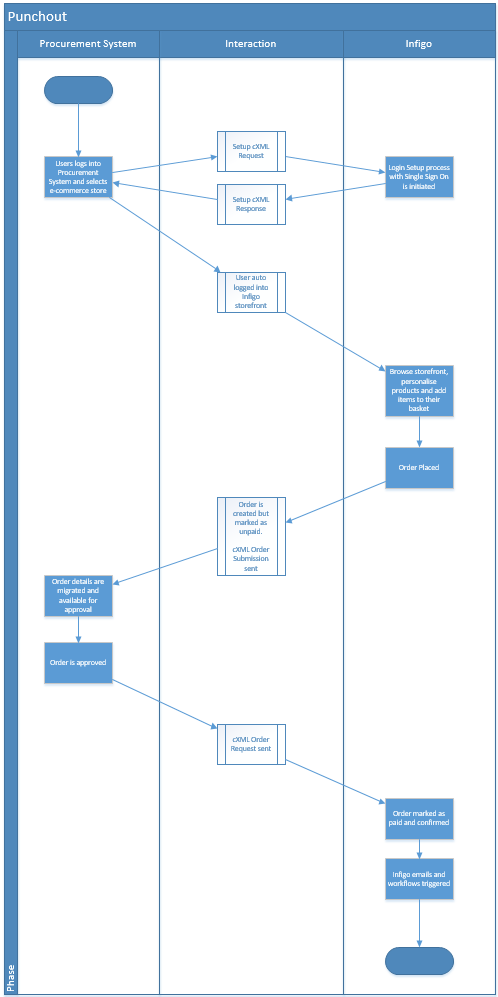
Between the two systems (Procurement/third party and Infigo) there are a number of interactions and data exchanges that are detailed in the below (and attached) diagram.
General setup
Once you have enabled the plugin on your platform you then need to configure it on the relevant storefront.
- Navigate to 'Connect Settings' in admin and then enable 'Connect: PunchOut' from the list of available plugins.
- go to 'Connect Plugins' and click configure against your PunchOut plugin in order to start setting it up.
- Enter in your Shared Secret (which you can obtain from the third party system).
- Then set your Punchout Sender Identity, Sender Domain, Infigo side identity and Infigo identity domain.
As part of the setup process Infigo will share with the third party system a webhook URL that they will use for the Setup cXML request step. This you can find from the bottom of the plugin configuration page.
Infigo will also share with the third party system a webhook URL for the order status update process. They will need to store this and then use it when calling the Order Request. This you can also find from the bottom of the plugin configuration page.
Setup cXML Request
Third Party → Infigo
The first interaction is the setup request. This is initiated by the third party procurement system and it is essentially establishing the connection with Infigo and requesting a Single Sign On URL for a particular user and session.
Infigo will also store the BrowserFormPost URL against the user as this will be used later in the order submission process.
In this request, the third party system will send a request similar to this:
<?xml version="1.0" encoding="UTF-8"?>
<!DOCTYPE cXML SYSTEM "http://xml.cxml.org/schemas/cXML/1.2.038/cXML.dtd">
<cXML payloadID="1528210417404-488391118527609149@216.109.111.6" timestamp="2018-06-05T07:24:25-07:00" xml:lang="en-US">
<Header>
<From>
<Credential domain="NetworkID">
<Identity>AN01000002779-T</Identity>
</Credential>
</From>
<To>
<Credential domain="Infigo">
<Identity>{Infigo Identity Setting}</Identity>
<Domain>{Infigo Identity Domain</Domain>
</Credential>
</To>
<Sender>
<Credential domain="NetworkUserId">
<Identity>tester@punchout.com</Identity>
<SharedSecret>******</SharedSecret>
</Credential>
<UserAgent>CatalogTester</UserAgent>
</Sender>
</Header>
<Request>
<PunchOutSetupRequest operation="create">
<BuyerCookie>ksuwteYooMAZpmuzoV9IdrXT6BUMUEJM0.0976259363610921832</BuyerCookie>
<Extrinsic name="UserEmail">test@infigosoftware.com</Extrinsic>
<Extrinsic name="UniqueName">username</Extrinsic>
<Extrinsic name="DisplayName">Test Test</Extrinsic>
<Extrinsic name="DepartmentID">1234</Extrinsic>
<BrowserFormPost>
<URL>http://test.punchout.com/checkoutcatcher.aspx</URL>
</BrowserFormPost>
</PunchOutSetupRequest>
</Request>
</cXML>
So in the above request you can see that information about the user, credentials to connect and also the BrowserFormPost url are all included in the initial request.
Infigo then checks if the Punchout credentials are correct, if they are then we start by checking if the user exists. If we do not find a match for the user then will create a user for them - assign them to the department (if passed and the department exists) and store the BrowserFormPost URL against that user.
NOTE: Extrinsic names (UserEmail, UniqueName, DisplayName, DepartmentID) are configurable in the Plugin settings.
NOTE: The department mapping works by setting an External ID against the department (checkout this article on how to assign external IDs) and then that External ID value should be passed in the setup punchout request in the 'DepartmentID' extrinsic field.
Then Infigo generates a Single Sign On URL and in the response to the third party system includes this URL:
Infigo → Third Party
<cXML>
<Response>
<Status code="200" text="{Error/Success message}">{Error/Success message}</Status>
<PunchOutSetupResponse>
<StartPage>
<URL>{SSO Login URL}</URL>
</StartPage>
</PunchOutSetupResponse>
</Response>
</cXML>
The third party system then takes this URL and presents it to their user as a way to navigate and access Infigo directly from their system. Clicking that url will re-direct the user and automatically log them into their Infigo account seamlessly.
Ordering products
Once logged in, the user will interact with Infigo in the same way any other user would. Navigating through the product category and ordering personalised and non-personalised products.
Adding all their items to the basket the user can then checkout which, though configuration, would be a streamlined checkout without delivery and payment methods to select or complete.
Order Submission cXML
Infigo → Third Party
When an order is placed in Infigo it is marked as unpaid, which means it is put into a temporary on-hold state until it is paid and can then be processed.
At this point a request is sent from Infigo to the third party system, using <BrowserFormPost> URL from the setup request that includes all the order information, as shown below:
<?xml version="1.0" encoding="utf-16"?>
<cXML
xmlns:xsd="http://www.w3.org/2001/XMLSchema"
xmlns:xsi="http://www.w3.org/2001/XMLSchema-instance" timestamp="timestmap" payloadID="payloadId" version="version">
<Header>
<From>
<Credential domain="domain">
<Identity>identity</Identity>
<SharedSecret>sharedsecret</SharedSecret>
</Credential>
</From>
<To>
<Credential domain="domain">
<Identity>identity</Identity>
<SharedSecret>sharedsecret</SharedSecret>
</Credential>
</To>
<Sender>
<Credential domain="domain">
<Identity>identity</Identity>
<SharedSecret>sharedsecret</SharedSecret>
</Credential>
<UserAgent>useragent</UserAgent>
</Sender>
</Header>
<Message deploymentMode="deploymentMode">
<Status code="code" text="text">value</Status>
<PunchOutOrderMessage>
<BuyerCookie>butercookie</BuyerCookie>
<PunchOutOrderMessageHeader operationAllowed="operation allowed" quoteStatus="quotestatus">
<Total>
<Money currency="currency">value</Money>
</Total>
<Shipping>
<Money currency="currency">value</Money>
<Description>description</Description>
</Shipping>
<Tax>
<Money currency="currency">value</Money>
<Description>description</Description>
</Tax>
</PunchOutOrderMessageHeader>
<ItemIn quantity="3">
<ItemID>
<SupplierPartID>supplierPart</SupplierPartID>
<SupplierPartAuxiliaryID>auxiliar</SupplierPartAuxiliaryID>
</ItemID>
<ItemDetail>
<Description>description</Description>
<UnitOfMeasure>unitofmeasure</UnitOfMeasure>
<UnitPrice>
<Money currency="currency">value</Money>
</UnitPrice>
<Extrinsic name="name">value</Extrinsic>
<Classification domain="domain">text</Classification>
</ItemDetail>
</ItemIn>
</PunchOutOrderMessage>
</Message>
</cXML>
When submitting this back to the third party system we will use the BrowserFormPost URL that we captured and stored as part of the Setup Request.
Third Party Approval
Once the contents of the order is submitted back into the third party system it can go through whatever approval workflows have been configured.
It is important to note that this integration only supports rejecting or approving at an Order Level. It is not currently possible to have a number of the items rejected for approval within the third party system and then have Infigo cancel off those items but continue with the rest of the order. The process would need to be cancel this order and place another.
Order Request cXML
Third Party → Infigo
Once the approval process has happened and the entire order is approved, the third party system will send its last request to Infigo that will effectively let us know that the order is paid, approved and good to be progressed.
<?xml version="1.0" encoding="UTF-8"?>
<!DOCTYPE cXML SYSTEM "http://xml.cxml.org/schemas/cXML/1.2.014/cXML.dtd">
<cXML xml:lang="en-US" payloadID="93369535150910.10.57.136"
timestamp="2000-08-03T08:49:11+07:00">
<Header>
<From>
<Credential domain="NetworkID">
<Identity>{Sender Identity Setting}</Identity>
</Credential>
</From>
<To>
<Credential domain="NetworkID">
<Identity>{Infigo Identity Setting}</Identity>
</Credential>
</To>
<Sender>
<Credential domain="NetworkUserId">
<Identity>tester@punchout.com</Identity>
<SharedSecret>******</SharedSecret>
</Credential>
<UserAgent>CatalogTester</UserAgent>
</Sender>
</Header>
<Request>
<OrderRequest>
<OrderRequestHeader orderID="{Infigo Order ID}">
<ShipTo>
<Address>
<PostalAddress>
<DeliverTo>John Q. Smith</DeliverTo>
<DeliverTo>Buyers Headquarters</DeliverTo>
<Street>123 Main Street</Street>
<City>Mountain View</City>
<State>CA</State>
<PostalCode>94089</PostalCode>
<Country>United States</Country>
</PostalAddress>
<Email>john_smith@acme.com</Email>
</Address>
</ShipTo>
<BillTo>
<Address isoCountryCode="US" addressID="12">
<Name xml:lang="en">Acme Accounts Payable</Name>
<PostalAddress name="default">
<Street>124 Union Street</Street>
<City>San Francisco</City>
<State>CA</State>
<PostalCode>94128</PostalCode>
<Country isoCountryCode="US">United States</Country>
</PostalAddress>
<Phone name="work">
<TelephoneNumber>
<CountryCode isoCountryCode="US">1</CountryCode>
<AreaOrCityCode>415</AreaOrCityCode>
<Number>6666666</Number>
</TelephoneNumber>
</Phone>
</Address>
</BillTo>
<Payment>
<PCard number="{PO Number}" expiration=""/>
</Payment>
</OrderRequestHeader>
</OrderRequest>
</Request>
</cXML>
On receipt of this request, Infigo will update a few elements on the order:
- The shipping address - if this is different to what was used in the original placement of the order (if one was captured then) then Infigo will update it to whatever address is sent back to ensure it is correct.
- The billing address - similar to the shipping address, we will update the billing address details against the order
- The PO Number - we will capture and update the PO Number against the order with what is sent back
- We will update the order to paid, which means it is no longer temporarily on-hold and can now be processed as normal.
- If any other connect plugin is enabled and configured it will be called at this point.
- Please note: there isn't anything in the existing logic which allows for the quantity of an order, the price of an order or the associated shipping dimensions and / or price to be updated after approval in the third party application.
NOTE: The ShipTo address details are mapped as so:
* DeliverTo (Array) - The second item in this list is mapped to the Address Line 2 in Infigo
* Street (Array) - The first item in this list is mapped to the Address Line 1 in Infigo